'%3e%3cellipse%20cx='185.202'%20cy='292.401'%20rx='236.2'%20ry='212.4'%20transform='rotate(180%20185.202%20292.401)'%20fill='url(%23paint0_radial_6113_7068)'/%3e%3c/g%3e%3cdefs%3e%3cfilter%20id='filter0_f_6113_7068'%20x='-130.996'%20y='0.000976562'%20width='632.398'%20height='584.8'%20filterUnits='userSpaceOnUse'%20color-interpolation-filters='sRGB'%3e%3cfeFlood%20flood-opacity='0'%20result='BackgroundImageFix'/%3e%3cfeBlend%20mode='normal'%20in='SourceGraphic'%20in2='BackgroundImageFix'%20result='shape'/%3e%3cfeGaussianBlur%20stdDeviation='40'%20result='effect1_foregroundBlur_6113_7068'/%3e%3c/filter%3e%3cradialGradient%20id='paint0_radial_6113_7068'%20cx='0'%20cy='0'%20r='1'%20gradientUnits='userSpaceOnUse'%20gradientTransform='translate(-43.0144%20248.324)%20rotate(-25.0248)%20scale(462.733%20514.489)'%3e%3cstop%20stop-color='%23FF9DDA'/%3e%3cstop%20offset='0.44'%20stop-color='%23F7FF9D'%20stop-opacity='0.52'/%3e%3cstop%20offset='0.84'%20stop-color='%23FF8B7B'%20stop-opacity='0.2'/%3e%3cstop%20offset='1'%20stop-color='%23F7FF9D'%20stop-opacity='0'/%3e%3c/radialGradient%3e%3c/defs%3e%3c/svg%3e)




Those workflows are probably a partial mystery even to those working there. Most communication is unspoken. Most knowledge, undocumented. Most systems are improperly wired, and any two databases will tend to not cooperate.
Further, there is something unique and wonderful about that acquisition target that made it worth acquiring. Your challenge is to consolidate duplicate systems and information flows without stripping away what made it unique. To reduce without subverting. To standardize, but not de-specialize. There are few more difficult challenges, nor fruitful opportunities.
In this guide, we share the insight from several authors who, together, have led dozens of ERP evaluations and migrations. They offer you a field manual for assessing those opportunities and deciding when to consolidate and how to best achieve one financial truth.
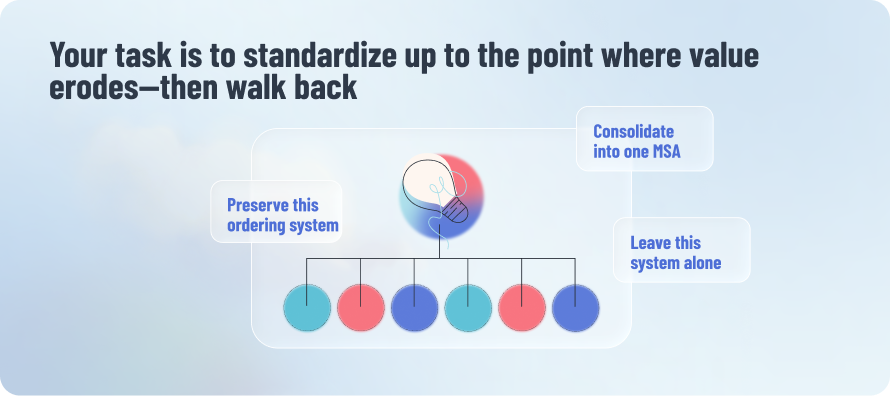
Your task is to standardize up to the point value erodes—then walk back
As businesses grow, they generate complexity as a sort of byproduct: more SKUs, more support teams, more regions, more departments, more centers of excellence. Complexity like this is good because in the short run, it helps you adapt to your market and customer. But it comes at the obvious cost of speed, and tangles up your work systems. By the time a company is a decently sized, matrixed organization, data moves slower and it’s harder to report and adapt.
All else being equal, you do not want to allow this newly acquired company to inject yet more complexity into your company’s financial information flows. If you can, you want to consolidate the acquired company’s ERP into your ERP by migrating those reports and workflows over.
And yet this is directly opposed to your other goal: to preserve its uniqueness.

You likely acquired the new company for its unique capabilities. It’s a specialty store with a cult following, professional services organization with a culture of engineering rigor, a software company with a reputation for usability, a grocery chain that manages to grow while spending nearly nothing on marketing. Often, those advantages are logistical: food facilities only rated for certain stock, located in a specific region. Or a fierce culture built on shared belief and generous benefits. Consolidating can weaken those networks and advantages. Recall that 57% of acquirers ultimately destroy shareholder value, according to KPMG.
57% of acquirers ultimately destroy shareholder value
Your job in those early days is to walk the factory floors and talk to everyone at all levels to understand where that unique value lies, and what systems support it. Because the converse can be true, too. A company could be uniquely successful despite its operations. When Uber acquired the ridesharing company JUMP Bikes, for example, the integrating team was surprised to learn that JUMP Bikes had no ERP. It was working out of spreadsheets, and losing millions of dollars of bikes per year. In that scenario, they had everything to gain from consolidation.
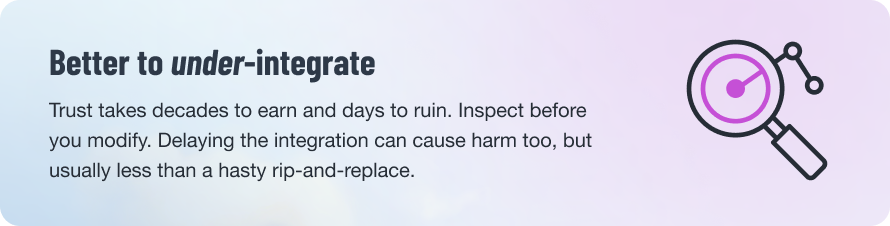
You may deploy the same ERP differently for different businesses A good ERP provides the right balance of structure and flexibility—rails to guide but malleability to support the company’s advantages. A flexible ERP can look completely different depending on the business it’s deployed for. Reevaluate your options each time. Technology is always changing.
I've even seen ERP deployed differently between business units, and that's because of how lean they are, or the deployment schedule. Maybe you can only launch one site at a time, and that changes the build.
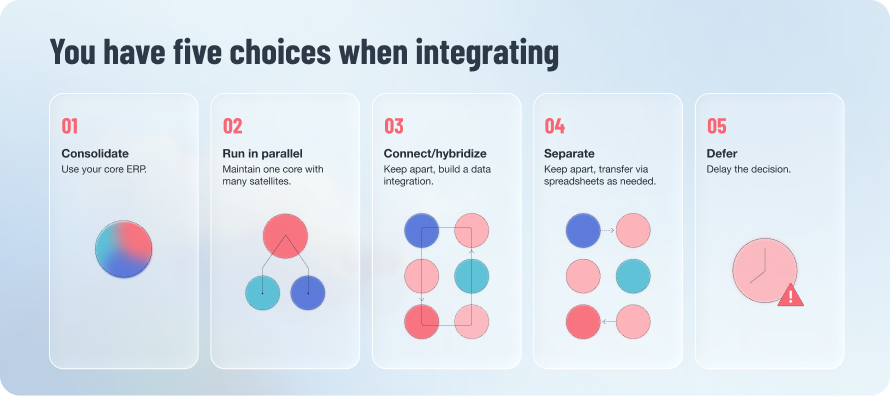
Your 5 integration options
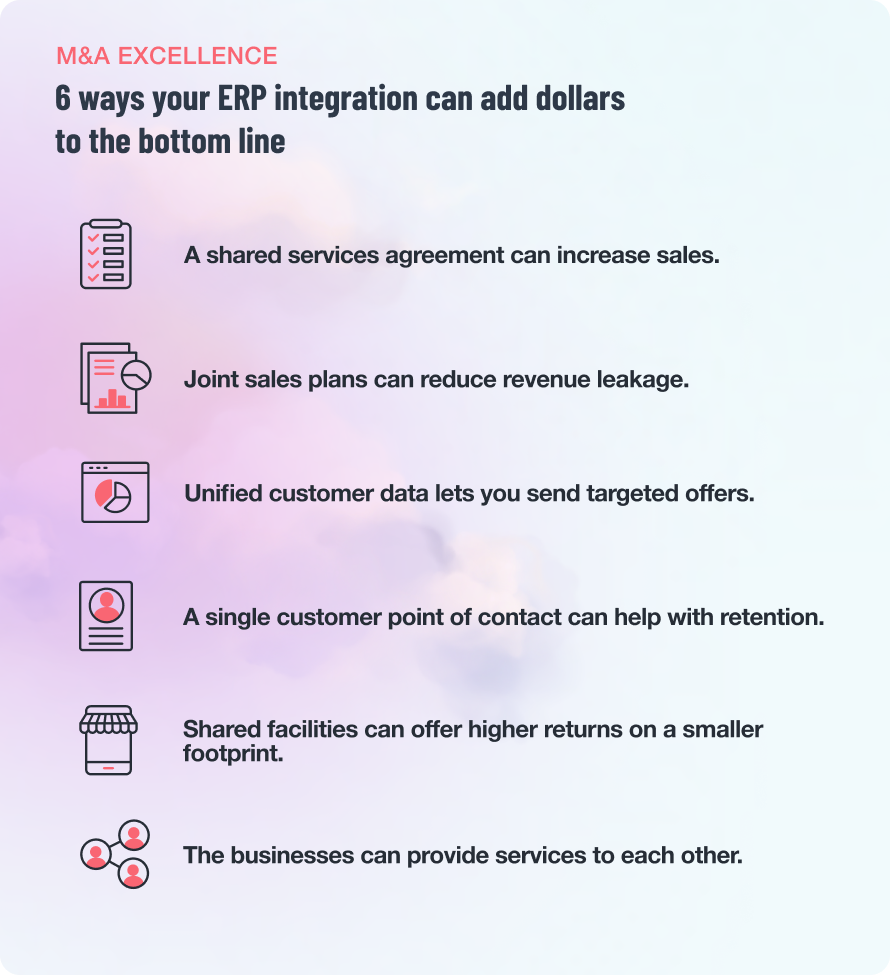
You can’t run an efficient business group without unified customer classifications, accounting methods, and reporting. And yet consolidation isn’t always the answer. Sometimes it’s better to run systems in parallel, or on rare occasion, keep them entirely separate.
It’s a risky choice you now face. Your integration decision today impacts accounting. It impacts how you manage the customer relationship. It impacts your growth targets and whether you stay within your budgets. It determines how and whether everyone’s key metrics work. If the integration fails or stalls, it can leave your team doing all that work manually in spreadsheets, potentially for quarters or years.
You have a lot to gain by consolidation or integration—provided it is practical and likely. Next, we explore your five options. In the following chapter, we discuss how to proceed.
01. Consolidate
Migrate the majority of the target company’s data and systems into the parent company’s ERP. It’s the cleanest long-term but expensive and disruptive in the short-term.
Pros: Best long-term solution Unified data and reporting Interoperable teams and systems
Cons: Disruptive—must align with fiscal years May degrade uniqueness, unless ERP is flexible
02. Run in parallel
You can implement a core ERP system for key financial and manufacturing processes, while allowing regional or specialized systems for other functions. This is known as a “core and satellite” approach.
Pros: May preserve each company’s specialty Offers a workable yet temporary bridge You can build an integration for some data
Cons: May preserve inefficiencies Creates data reconciliation issues
03. Hybridize
Keep the acquired company’s ERP, or only migrate some modules but preserve others, and connect it all via master data management systems and middleware. This is common when the acquired company has a meaningfully better system in one regard that directly supports its unique advantage.
Pros: Offers a workable yet temporary bridge
Cons: Preserves key unique features Creates complication More system fees, less purchasing power Data reconciliation issues
04. Separate
This is rarely a good idea. It occurs where the newly acquired company’s accounting and structures are so different, there is no easy, meaningful transition. Or where the subsidiary is functioning so well on its own, there is no sense in slowing it down.
Pros: Sometimes preferable to the alternative If you do this, still standardize classifications and codes
Cons: May preserve uniqueness Guaranteed data reconciliation issues Severely limits your synergies
05. Defer
In some cases, it makes sense to defer the integration because you’re limited on resources or because the target’s systems are so convoluted or unclear, it will require more research.
Pros: May be wiser than a quick, wrong move
Cons: Prevents most synergies Creates data reconciliation issues
The 9-step integration process
There is, unfortunately, no such thing as a harmless integration. There will always be costs. Some employees will resist learning a new ERP system no matter how advanced it is, because it demands time they simply don’t have. There will be details and technicalities where you have to reallocate and reapply transactions and tagging. Some bugs will affect customers, who may similarly resist learning anything new. There can be failed reporting, lost invoices, and blame.
However, this integration is about maximizing the opportunity while reducing the harm, and the equation is never perfectly balanced.
1. Identify the capabilities of both the core and target ERP
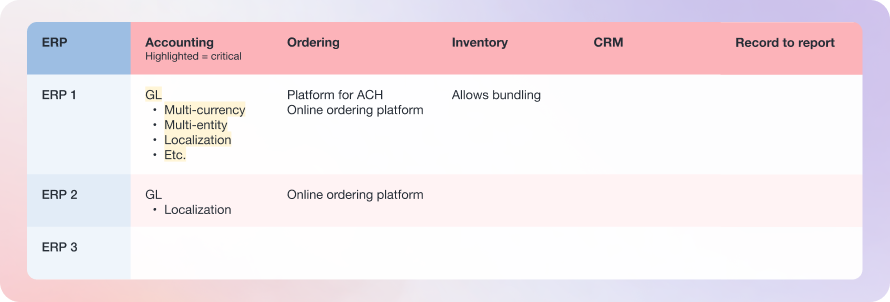
What can you do with it? What can’t you? What functionality is native, and which is custom? How are the customizations maintained, and are the people who implemented them still around? If you’re dealing with more than two ERPs, create a matrix of capabilities that identifies what you have in each of those categories—what you’d gain, and what you’d lose.
To quickly audit for uniqueness:
Talk to the company’s customers.
Review its order forms.
Review the menus in its financial applications.
Ask how orders flow through the systems.
Ask what metrics each team watches.
Ride along with heavy users of that ERP and look into all the connected databases. Look at journal entries, look at inventory management, and look at the home screens of all those systems. The homescreen and menus tell me almost everything about what you can do in there.
2. Audit the workflow and data flows—create process maps
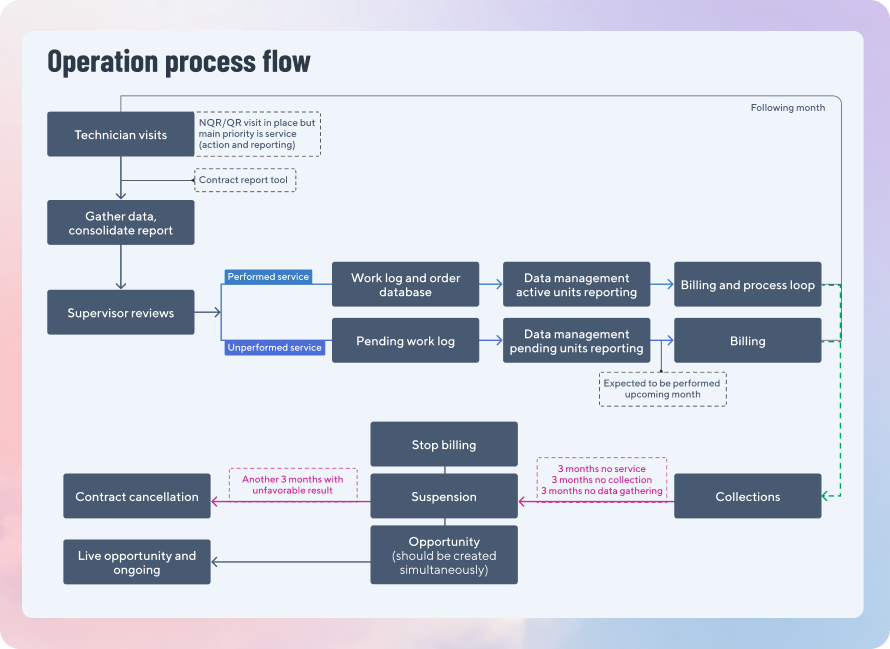
Start with the due diligence documentation, and go further. How does information find its way into the ERP? Create a series of process flow diagrams for the critical workflows to understand the databases, connections, and unknowns. Any area that’s blank, or has a question mark, is an area for further investigation. Sometimes data types are hidden, as when an older ERP was counting employee expenses as vendor bills, but now you can separate those out. Many data sources not traditionally hooked into the ERP belong in it, like people data (expenses, payroll, commission, payroll tax) and asset data. Questions: How does information find its way into the ERP? Who are the downstream consumers of that information? What are people doing outside the systems? What are the sub-entities, and how does the accounting roll up?
3. Present on that company’s unique advantages
Given all you’ve uncovered, what about the people, partnerships, IP, process, and technology are critical to the company’s competitive advantage? How does the ERP support or hinder that advantage? Specifically, what modules, features, and capabilities?
4. Make a recommendation
Before you can recommend, there are a few final considerations. Everything may point to consolidation, but maybe it’s mid-year and the company is about to enter into the Black Friday/Cyber Monday season. Or maybe the company’s IT experts are completely focused on other projects. The recommendation could be a “Yes” on every level except timing, in which case, it’s a “Defer.”
Your presentation should include:
The recommendation Rationale, cost/benefit analysis
Summary of unique advantages
Timeline
Necessary team size and roles
Opportunity
Risks
Process
Select systems
Select implementation partner
Change management Clean data
5. Build the team
Staff the teamIf you are completing multiple integrations this year and will continue to integrate more companies, consider building a transformation center of excellence. It’s a smart way to build knowledge around what does and doesn’t work. So much learning occurs in each migration, only a dedicated migration center can ensure you capture it all and avoid repeating mistakes.
An integration team should consist of:
Executive sponsor
Information technology representative
Project managers
Finance representative
GM of that operation
Learning and development
Also consider including
Warehouse/production leader
Merchandising
In larger projects: Human Resources Legal
6. Evaluate the ERP(s) and sign contracts
Even if you are consolidating another ERP into your current ERP, revisit yours anew—especially if it has been a while. Technology is constantly changing, and it’s usually worth running a request for proposal process, if for no other reason to learn and to remind your current ERP partner they need to continue to win and rewin your business.
30 questions to ask when evaluating an ERP →
7. Define a rollout process and timeline
Consider that some sites will go live earlier than others, and it’s best to start with those that are the most ready and most technically proficient. Also start with the readiest teams, and the hand-raisers on those teams. A few motivated champions in each department can help smooth the work far better than any volume of email or incentives ever could. The process: Audit the data and information flows. Build the data warehouse. Extract and transform all reporting and data. Plan for downtime.
8. Implement, test, and train
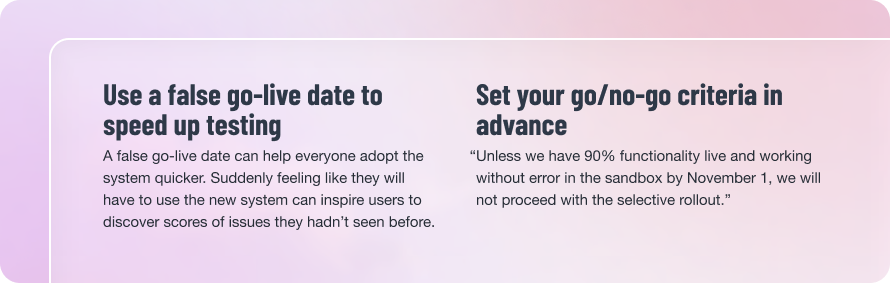
Once the ERP module(s) are built, test everything in a simulated, sandbox environment. The quality of your sandbox matters—a live sandbox can be refreshed in seconds and lets you test with real production data, not just a partial dataset. This can substantially reduce the risk of a rollback at launch time.
Involve the learning and development team in building a curriculum for retraining all the various functions that’ll interact with the ERP. However challenging you think change management will be, it will be harder—and in dimensions you cannot foresee. It is the number two factor that kills ERP implementations behind technological constraints.
Conduct thorough user acceptance testing (UAT) in the sandbox. Test with people at both junior and senior levels. Stay silent and allow them to struggle—every misunderstanding or mistake tells you what you either need to change about the interface, or train for. People should feel comfortable doing their job before you proceed. The risks of rushing this are panic—and a painful, expensive rollback to the old system while you sort bugs out.
9. Troubleshoot
No implementation ever goes perfectly, and when it goes wrong, it’s typically a failure in testing. There were hidden workflows or data flows that nobody actually understood, and small kinks in the data pipeline caused everything to back up. This is normal. Again, your mission is simple: To consolidate as much as possible without causing harm and degrading that company’s unique specialness. Sometimes more integration isn’t possible, for now.
Many entities into 1 truth Throughout this guide, we’ve endeavored to explain how to unite multiple entities into one financial truth, so you can realize all the benefits of having acquired a new company. But we left something important out. As vital as people and process are, technology is playing an increasingly important role. Finance teams are acting a lot more like technology teams, and whereas ERP systems didn’t change substantially from 1990 to 2020, we’re suddenly in a new era. Now they are quite different. AI is the first technology ever to be able to continuously reduce the complexity of systems. It’s the first time employees can chat with an ERP system to complete work without learning the interface. It’s the first time your team can chat to generate a whole new personalized treasury management app tailored to your business.
To learn more about the future of ERP, schedule time to learn about Everest.