'%3e%3cellipse%20cx='185.202'%20cy='292.401'%20rx='236.2'%20ry='212.4'%20transform='rotate(180%20185.202%20292.401)'%20fill='url(%23paint0_radial_6113_7068)'/%3e%3c/g%3e%3cdefs%3e%3cfilter%20id='filter0_f_6113_7068'%20x='-130.996'%20y='0.000976562'%20width='632.398'%20height='584.8'%20filterUnits='userSpaceOnUse'%20color-interpolation-filters='sRGB'%3e%3cfeFlood%20flood-opacity='0'%20result='BackgroundImageFix'/%3e%3cfeBlend%20mode='normal'%20in='SourceGraphic'%20in2='BackgroundImageFix'%20result='shape'/%3e%3cfeGaussianBlur%20stdDeviation='40'%20result='effect1_foregroundBlur_6113_7068'/%3e%3c/filter%3e%3cradialGradient%20id='paint0_radial_6113_7068'%20cx='0'%20cy='0'%20r='1'%20gradientUnits='userSpaceOnUse'%20gradientTransform='translate(-43.0144%20248.324)%20rotate(-25.0248)%20scale(462.733%20514.489)'%3e%3cstop%20stop-color='%23FF9DDA'/%3e%3cstop%20offset='0.44'%20stop-color='%23F7FF9D'%20stop-opacity='0.52'/%3e%3cstop%20offset='0.84'%20stop-color='%23FF8B7B'%20stop-opacity='0.2'/%3e%3cstop%20offset='1'%20stop-color='%23F7FF9D'%20stop-opacity='0'/%3e%3c/radialGradient%3e%3c/defs%3e%3c/svg%3e)




Ramp wants to put time back in your team’s day by creating approval workflows that manage themselves. Everest wants to create a world where ERP actually speeds up your team’s work—where the old blockers give way to tools that finance managers and accountants want to use. Both believe your team shouldn’t have to waste time building workarounds in spreadsheets.
“The Everest integration is an exciting and strategic one for us,” says Teddy Riker, Product Manager at Ramp. “This means even more customers will be able to automate even more workflows from swipe to sync, reducing the amount of manual categorization work your accountants and finance staff will need to do.
Here’s what’s now possible for Everest customers that integrate with Ramp.
The Everest-Ramp integration synchronizes your spend data
The Everest-Ramp integration keeps spend in sync across multiple entities so you can close each period faster and without manual .csv uploads. Simply mark your transactions as “ready for sync” in Ramp and watch them sync to Everest in real-time.
Full transaction syncs: Bills, employee expenses, payments, card transactions, cashback redemption, and statement payments.
Jump links: Once transactions are synced, you can click a transaction in Everest and be taken to Ramp, and vice versa.
Synced characteristics: Map departments, business units, customers and projects, and other Ramp custom fields for rich reporting and allocations.
It’s built for multi-entity orgs: You can configure per-entity default accounts and a sync start dates to ensure the correct ledger impact.
AI where it matters: Once data arrives in Everest, finance teams can use AI-assisted flux explanations to ask for ideas to speed up the close or to flag any irregularities. This is something you can’t do with any other general ledger software.
The result is you’ll have the appropriate financial records for bills, credit card transactions, reimbursements, and payments for all your multi-entity spend data. That means transactions from multiple entities flowing smoothly into Everest, no .csv imports needed.
The result is you have the appropriate financial records for bills, credits, credit card transactions, reimbursements, and payments for all your multi-entity spend data.
Curious about the integration details?
Default accounts
For efficiency, Everest defines default accounts in Ramp. These are editable.
Two options for syncing vendor bills
You can either sync after transactions are created, or after they are fully approved.
Option 1: Sync after creation
When you create a Bill in Ramp, it syncs immediately to Everest
This creates an unapproved vendor bills in Everest (no accounting impact)
Bills remain in pending approval status until approved in Ramp
When approved in Ramp, the bill is posted with full accounting impact
Option 2: Sync after full approval
Bills only sync to Everest after they are both created and fully approved in Ramp
This creates posted vendor bills directly in Everest with immediate accounting impact
Bills created in Ramp show up in Everest as “outbound” payments
When bills are paid through Ramp's Bill Pay, outbound payment records are automatically created in Everest. Payments sync when the status is Paid, not Initiated.
Everest recognizes Ramp cards
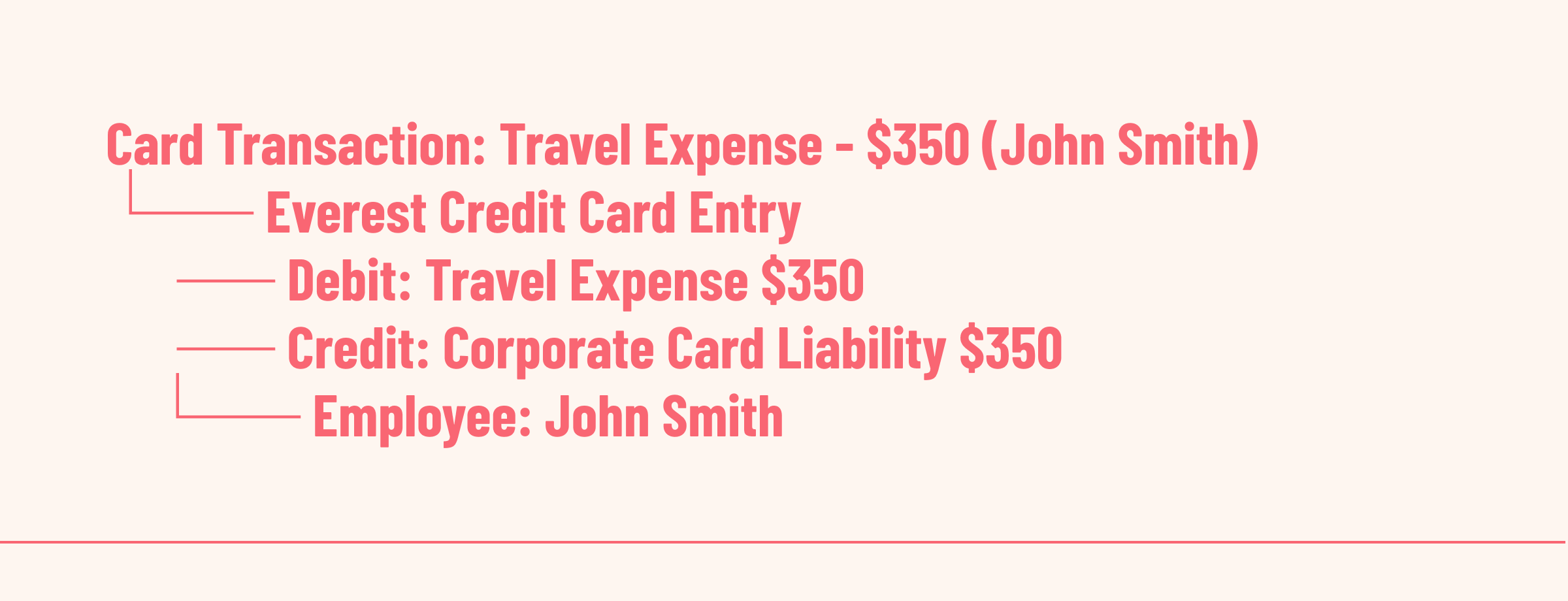
Ramp Card transactions create credit card entries in Everest, tagged with the employee assigned to the card. This supports allocating expenses to individual employees and reporting, and employee-based reporting.
Everest captures Ramp employee reimbursements
Reimbursement submissions in Ramp create expense reports in Everest associated with the submitting employee.
Users will have to indicate bills paid by Ramp corporate cards
For bills created with a Ramp Card, a user must match the card transaction to the bill. Once that happens, Everest will sync the credit card transaction as a payment for the vendor bill. We recommend marking these before syncing transactions.
Everest captures corporate credit card statements
This includes debits (corporate card liability, reducing the balance) and bank accounts (payment source).
Everest recognizes Ramp bill status and modifications
Bills can be marked in either system as pending, approved, rejected, or archived/deleted. (Bills pending approval are only synced if you enable “Sync bills after creation.”)
Everest supports custom Ramp fields
You can configure custom fields in Ramp to track customer-billable expenses. You can then map Ramp custom fields to Everest customer IDs, and apply them to bill lines, credit card transactions, and reimbursement lines. Everest will automatically recognize Ramp department selections, business unit codes, and detailed expense reporting and allocation.
Everest intelligently syncs timing data like transaction dates
This integration ensures that your Everest books accurately reflect your Ramp spending activity while maintaining proper internal controls and audit trails.
Key date fields:
Bills: Uses invoice date from Ramp
Payments: Uses actual payment processing date
Credit cards: Uses settlement date (not purchase date)
Reimbursements: Uses submission date
Transfers: Uses creation date
Sync Frequency:
Real-time: High-priority transactions (payments, approvals)
Hourly: Standard transaction sync
Daily: Master data and reconciliation
Questions about how you can use this integration to speed up your period end closes? Schedule a demo with our sales team, some of whom are former CPAs.